Job Links
Trackable CV links for every job application.
Give each company or role its own HostedCV link. Share your CV, compare engagement across applications, and keep your next follow-up organised.
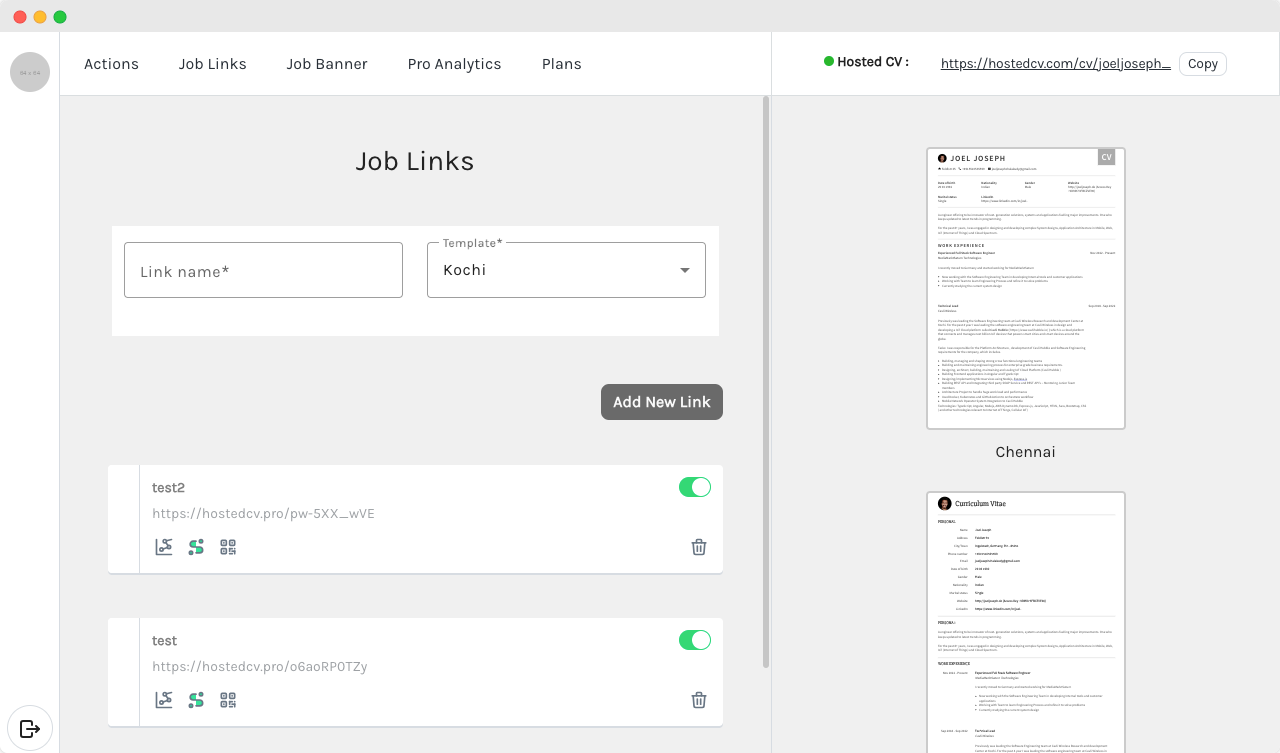
One CV profile. A link for each opportunity.
A single shared CV URL brings all your visits together. Job Links let you separate activity by company or role, so you can see which link received attention.
Name each application link
Use a company or role name to keep links easy to recognise. Share the matching URL in your application or email.
Compare link engagement
Open analytics for an individual job link to review its activity. Keep one link per role for clearer attribution.
Choose a presentation
Assign a CV template to a link where your plan supports template selection. Preview your hosted CV before sharing.
Share the right link with the right application.
Start with your hosted CV, then create job links from your dashboard.
Create and copy your link
Name the link for the opportunity, choose an available template, and copy the URL into your application.
Share a QR code
Open the QR code for a job link when you need a scannable way to share your CV in print or at an event.
Review activity and manage access
Check link analytics and enable or disable links as your search changes. Activity can help you prioritise a follow-up, but it does not confirm who viewed your CV or promise an interview.
Questions about Job Links.
What is a job link?
A job link is a named, trackable URL for your HostedCV profile. Create a separate link for each company or role to review engagement per application.
Is Job Links the same as the Job Application Tracker?
Job Links manages the CV URLs you share. The Job Application Tracker organises application statuses, contacts, notes and follow-ups. You can attach a role-specific CV link to an application row.
Can I see which application gets attention?
Separate links help you attribute activity to the URL shared for that role. A link can be forwarded or opened more than once, so activity is an engagement signal rather than proof of recruiter intent.
How do I start?
Create a HostedCV account, set up your CV profile, and open Job Links in the dashboard. Feature availability depends on your plan; check pricing for current options.

Give every application its own CV link.
Keep your links organised and see where your CV receives attention.
Create job links