Job Application Tracker
Track every job application in one table.
Statuses, follow-ups, and application stats in one place — with a tracker that can tell you when your CV gets opened. Included with HostedCV, and every new account starts with a full-access trial.
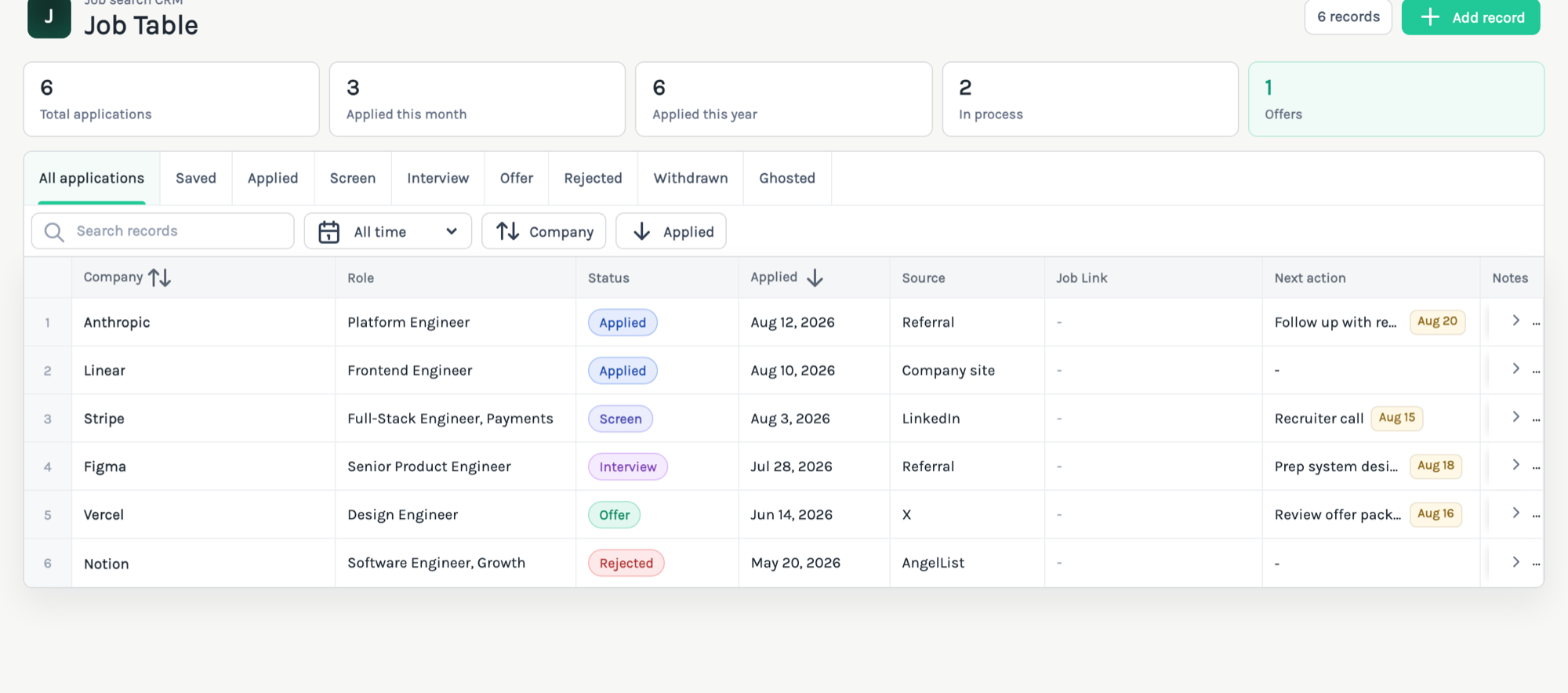
Everything your spreadsheet did — minus the spreadsheet.
The Job Table gives your search the structure a spreadsheet never quite holds onto: one row per application, a clear pipeline, and numbers that update themselves.
An eight-stage pipeline
Saved, Applied, Screen, Interview, Offer, Rejected, Withdrawn, Ghosted — every application has a clear place, and colour-coded status chips keep the table scannable.
Stats that update themselves
Applications this month, this year, in process, and offers — counted for you at the top of the table, so you always know how active your search really is.
Find anything fast
Search by company or role, jump between status tabs, or narrow the table to this month, the last 90 days, or this year.
One row holds the whole application.
Edit statuses and dates directly in the table, or open a row for the full picture.
Company, role, and source
Where you applied, for what, and how you found it — LinkedIn, referral, company site, anywhere.
Follow-ups that don't slip
A next action and date on every row — "recruiter call Friday", "chase up in a week" — visible right in the table.
Notes, salary, and recruiter contact
Keep interview notes, salary expectations, and the recruiter's email on the application itself — one click to write a follow-up.
The tracker that knows when your CV gets opened.
A spreadsheet can tell you where you applied. It can't tell you what happened next. Because the Job Table lives beside your hosted CV, every application can carry its own trackable CV link.
A CV link on every row
Attach a role-specific trackable CV link to any application and its click count shows up right in the tracker.
Follow up on real signals
A recruiter opened your CV twice this week? That's the application worth a follow-up — not the one that's gone quiet.
No more spreadsheet drift
Statuses stay consistent, dates stay dates, and nothing lives in a forgotten tab. The table keeps your search structured as it grows.
Tied to a CV that stays current
Your applications point at a hosted CV profile — update it once and every link you've shared shows the latest version.
Frequently asked questions
How do I start tracking my job applications?
Create a HostedCV account and open the Job Table from your dashboard. Every new account starts with a full-access trial, so you can track applications from day one.
What statuses can I track for each application?
Each application moves through an eight-stage pipeline: Saved, Applied, Screen, Interview, Offer, Rejected, Withdrawn, and Ghosted. You can filter the table by any stage.
How does CV link tracking work with the tracker?
You can attach a role-specific HostedCV link to any application row. When a recruiter opens that link, the click count appears directly in your tracker, so you can see which applications are getting attention.
Do I need to build my CV on HostedCV to use the tracker?
The tracker works on its own for organising applications, statuses, and follow-ups. Hosting your CV on HostedCV unlocks the engagement features, like per-application CV links and view analytics.
How is this better than a spreadsheet?
A spreadsheet cannot tell you when someone opens your CV. The Job Table keeps statuses, notes, recruiter contacts, and follow-up dates structured, adds automatic stats, and connects each row to a trackable CV link.

Stop running your job hunt from a spreadsheet.
Track every application, follow up on real signals, and keep your CV one link away.
Start free trial